Memory Addresses on Macs
If you want to watch the memory address of a variable x on a mac, you can't use just &x.
You need to surround the address of request with ${ } like this:
${&x}
Show String in Detail
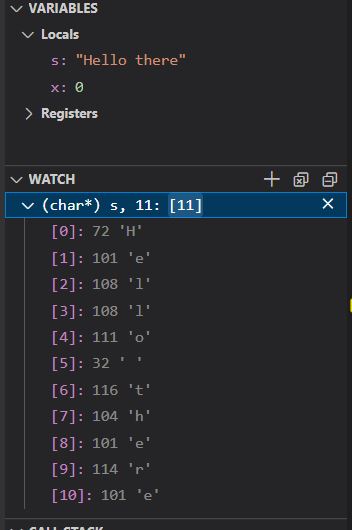
To see all the characters in a string s listed with their index, add a watch that
looks like:
(char*) STRING_NAME, SIZE
STRING_NAMEshould be the name of the string you want to view.SIZEis the number of chars to show. If you ask for more characters than are in the string, you will see extra memory that is not part of the string.
Here is an example of viewing 11 characters from the string s:
Show an Array
The debugger will show the contents of a statically allocated array when the array is viewed in its original context.
When an array is passed into another function, or when an array is allocated dynamically, the debugger doesn't know how many elements there are. So you usually will just be shown the first element. To see the rest, use the instructions below:
PC
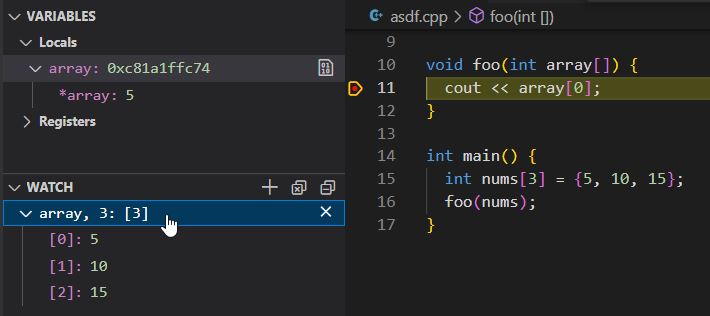
Add a watch that looks like:
ARRAY_NAME, SIZE
ARRAY_NAMEshould be the name of the array you want to view.SIZEis the number of elements to show. If you ask for more elements than there are in the array, the "extra" elements will be unpredictable values from nearby memory.
Here a watch is showing 3 elements from the array named array. Notice that the Locals pane just
shows the first value from the array (5).
Mac
To see the contents of your array, you need to add a Watch with the following syntax:
ARRAY_NAME,[SIZE]
So to watch the array pages if it is 10 items long, you would use:
pages,[10]
Note that you cannot use a space on either side of the comma.