Valgrind is a tool for checking for memory issues in your code - spots where you leak memory or spots where you access invalid memory. Valgrind is only supported on Linux. If you are using Windows, you can install Windows Subsystem for Linux (WSL) and use Valgrind in WSL. If you are using a Mac, you can use the Leaks tool instead.
Setup
In a terminal (WSL terminal if on Windows), install valgrind:
apt install valgrind
If you are using a non apt based Linux distribution, you may need to use a different package manager or install from source. Check out the Valgrind website for more information.
Building Code
It is crucial that you build your code with debugging information included. That will allow Valgrind to give you more helpful error messages. To include debugging information, the -g flag must be part of your compile recipe. For example:
g++ -g -o program.exe ...
This should be the default in your makefile. Generally, you will be able to build by just doing
make
When you build your program in Windows, you create an executable that is only designed to run in Windows. When you build you program in Linux, you create a program that is only designed to run in Linux.
If you program refuses to run, you might be running the wrong version!!! Try deleting program.exe
and recompiling the code on the platform you are trying to run it on.
Running With Valgrind
To use valgrind on your program, run valgrind and tell it to run your program.
valgrind ./program.exe
If there are memory errors, it will spit out a report like the following:
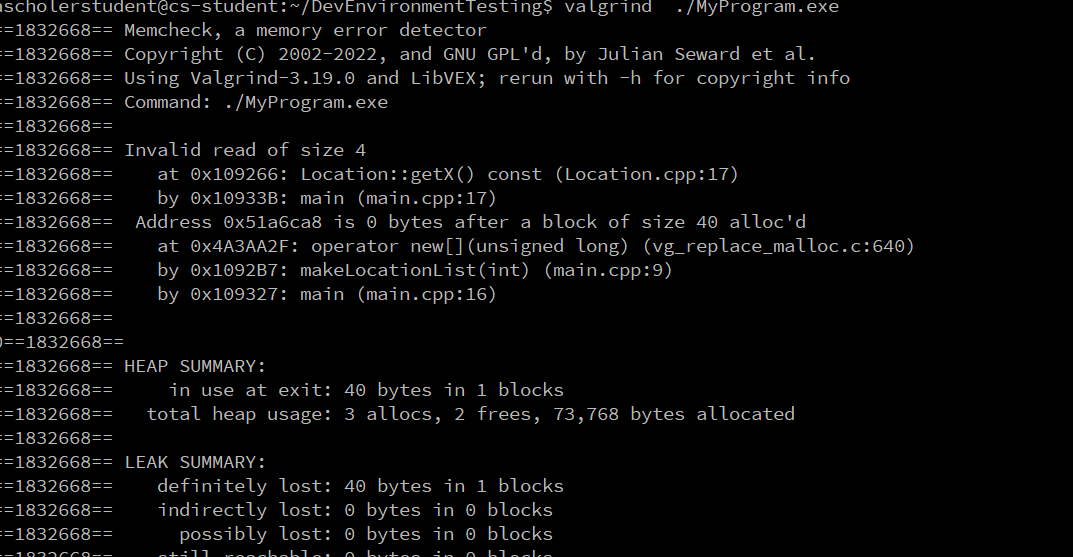
The report is likely quite long, scroll back up to the top and worry just about the first error. (One memory issue can cause a cascade of other, possibly phantom issues. Fix one issue at a time, starting from the first one encountered.)
You can also direct the output to a file if you want to save it or read it more easily:
valgrind ./program.exe valgrind-output.txt 2>&1
The 2>&1 part says to redirect standard error (stream 2) to standard output (stream 1). This is needed to make sure that the error messages (which are sent to "standard error" or output stream) get included in the output file instead of just being printed to the terminal.
The error report will look much like the one for Address Sanitizer, that is discussed in the textbook.
This video demonstrates using Valgrind within WSL: