Rectangle
General
- All submissions must include a work history to be worth credit.
- Submit all files to Canvas. Make sure to name file(s) EXACTLY as specified - including capitalization.
- Make sure your program accepts input in EXACTLY the order and format given.
Do not ask for extra input or change the order of inputs.
If you want to make an expanded version of a program that and get feedback on it, email it to me or show me in class. - Slight variations in output wording/formatting are usually fine
(as long as formatting isn't part of the assignment).
If you do not get the right final output, print out some evidence of the work your program did to demonstrate your progress. - Readability and maintainability of your code counts. Poor formatting, confusing variable names, unnecessarily complex code, etc… will all result in deductions to your score.
Requirements
Overview
You will create a class Rectangle that represents a simple rectangle on a Cartesian
plane. You are not writing any particular program that uses rectangles,
but the tool that could be used by someone who wanted to write a program
and use your Rectangle class to do it. The way you will demonstrate your
code works is by providing unit tests in tests.cpp.
Your Rectangle class will use a provided Point class to help represent the rectangle.
For the purposes of this problem, we will assume our rectangles are always aligned with the axes (their sides are always perfect up and down or side to side). A rectangle that is aligned to the axes can be described by the location of its upper left vertex, a width, and a height:
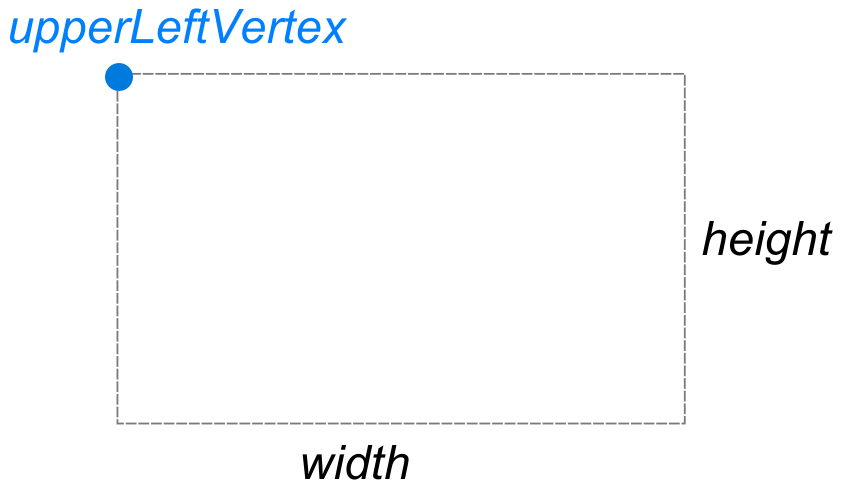
There are of course other ways we could represent the shape. We could store two Points representing opposite corners of the rectangle. (An upper left and a lower right points.) We could store a point representing the center of the rectangle, along with its width and height.
Each representation will make some jobs easier and some jobs harder.
We should not store redundant information. For example, if we store the upper left vertex and the width and height, we can compute the lower right vertex when needed. If we store the two opposite corners, we can compute width and height when needed.
Your task is to pick a representations for the implementation, using at least one Point as a member, and then build a class Rectangle that provides the public interface described below:
Remember that UML does not show things like const qualifiers or passing by reference.
Assignment Instructions
Setup
You should use the Unit Test Project Template (or combo project and just use the unit test program in it) in either a codespace or a local development environment to do this assignment.
While working on this assignment, MAKE sure that you are generating a worklog with time stamped entries.
Then add these four files to your project:
Rectangle.h: This will have the declarations for the functions you write.Rectangle.cpp: This will have the definitions for the functions you write.Point.h: This will have the declarations for the provided Point class. Start it with code in this copy of Point.h.Point.cpp: This will have the definitions for the provided Point class. Start it with code in this copy of Point.cpp.
In your Makefile, add Rectangle.cpp and Point.cpp to the SHARED_FILES variable and Rectangle.h and Point.h to the HEADERS variable. It should end up looking something like this:
...existing content...
HEADERS = Rectangle.h Point.h
...existing content...
SHARED_FILES = Rectangle.cpp Point.cpp
...existing content...
In your tests.cpp, add #include "Rectangle.h" and #include "Point.h" at the top of the file
(after the #include "doctest.h" line). You can remove the sample tests that were in the file
(or comment them out to use as reference).
If you are on Windows, you may have a conflict between your Rectangle class and one that
is part of a standard library. If you see weird errors talking about Rectangle, add this
line to the top of your tests.cpp file (it must come before #include "doctest.h"):
#define NOGDI
Process
You should focus on building and testing one function at a time. The recommended process is:
- Get the Rectangle class declared in Rectangle.h. Initially, just declare the class, its member variables, one constructor (your choice which one), and one getter function.
- Implement that constructor and getter in Rectangle.cpp.
- Write unit tests for that constructor that uses the getter to verify it works.
- Once that is working, move on to the next function. Implement it, then write tests to verify it works.
Testing Guidelines
Your Unit tests in tests.cpp should test each public member. Each TEST_CASE should focus on testing one function. It is NOT okay to wrap a bunch of unrelated tests into one test function (e.g. one TEST_CASE that tests both getPerimeter and getArea). It is okay, in fact necessary, to use other functions as part of your tests—for example, it would be impossible to test the constructors without using getUpperLeftVertex function.
You may need multiple tests for any given function (a bool function should be tested to make sure it answers both true and false at appropriate times).
Here is a sample test for the Rectangle constructor that takes three arguments.
It uses getUpperLeftVertex, getHeight, and getWidth
to get you going. Uncomment one require at a time as you implement the functions needed.
TEST_CASE( "Rectangle/Constructor1 - 3 Arguments" ) {
    // Build rectangle
    Point p1(1, 5);
    Rectangle r1(p1, 2, 4);

    // Verify upper left vertex is correct
    // Point temp = r1.getUpperLeftVertex();
    // REQUIRE( temp.isSameAs(p1) == true );

    // Verify dimensions
    // dimensions are doubles, compare using Approx from doctest to check equality
    // REQUIRE( r1.getHeight() == doctest::Approx(2) );
    // REQUIRE( r1.getWidth() == doctest::Approx(4) );
}
The tests are the proof your code works as expected. Make sure to leave all tests that successfully compile uncommented (i.e. make sure they run).
It is better to have a failed test than a commented out test - it shows that the function was declared correctly and is doing something.
Function Descriptions
Below are descriptions of expected behavior. Descriptions are written in UML format, not C++. You need to translate parameters/return types.
Remember that UML does not specify things like const qualifiers and passing by reference. It is up to you to decide where those are appropriate.
For each function, provide one or more TEST_CASES in the
tests.cpp file that show the function works. See Testing
Guidelines below.
Each function should have doxygen comments in your .h file.
When possible, use functions from Point to help you do work.
Rectangle(p1 : Point, heightValue : double, widthValue : double)
Construct rectangle using given point as upper left corner and the indicated width and height.
Rectangle(p1 : Point, p2 : Point)
Construct rectangle that has the two points as opposite vertices. The two points might not be in order as upperLeft and lowerRight. The constructor should figure out appropriate coordinates to use for its state based on coordinates of these two points.
Example: If the Points given are (10, 5) and (4, 2), the rectangle should have an upper left vertex of (4, 5), and either a height of 3 and width of 6 or a lower right vertex of (10, 2).
getUpperLeftVertex() : Point
Return Point representing location of the upper left vertex of the rectangle
getWidth() : double
Returns value
getHeight() : double
Returns value
getArea() : double
Calculate and return value
getPerimeter() : double
Calculate and return value
getCenter() : Point
Return Point representing location of the center of the rectangle
translate(x : double, y : double)
Translate is the fancy word for "move". Move the rectangle by the given amount in x and y dimensions.
contains(p : Point) : boolean
Return true if indicated Point is within the rectangle (on edge counts as within)
isSameAs(other : Rectangle) : bool
Return true if the two rectangles have the same values for member variables. Note that to compare Points, you will need to use the isSameAs function from the Point class.