Assignment 6
General
The questions for this assignment are below. Record your answers in this response document. Do not copy the questions into your response document; only fill in your answers. When you are ready to turn it in, save it to your computer as a PDF with File→Download→PDF Document. Then submit that PDF to Canvas by the due date.
Little Computer
This Little Computer program takes one number as input and then prints either 0 or 1. Use a combination of reading the code and experimentation to find all the inputs that will cause it to print 1.
You can use this Little Computer with the program already loaded.
Address Value 00 901 01 313 02 215 03 810 04 514 05 213 06 810 07 517 08 902 09 612 10 516 11 902 12 000 13 000 14 005 15 010 16 000 17 001
- Translate this Little Computer Assembly to machine code.
Address Value Assembly 00 ??? START INP 01 ??? STA X 02 ??? SUB SECRET 03 ??? BRP EXIT 04 ??? BRA START 05 ??? EXIT LDA SECRET 06 ??? OUT 07 ??? HLT 08 ??? X DAT 0 09 ??? SECRET DAT 10
Compression
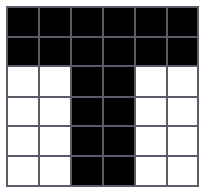
The image below is a 6×6 area of a fax we are sending. Representing white squares with 1 and black squares with 0, we would represent the second row as 000000 and third row as 110011. The rows are sent one after another, so those rows together would be 000000110011. The whole image would look like a sequence of 36 bits.
Give a run-length-encoded version of the whole image. Put counts in parentheses for clarity, e.g. (5)1 to indicate the digit one repeated five times.
Expand the following compressed string according to the same-as-earlier trick.
QRSTUV-b3c6Construct a Huffman code given these symbols and their relative weights.
Symbol Weight A 4 B 3 C 2 D 10 E 4 Show your final Huffman tree with all of the symbols at the leaves, and a table showing what code is used for each symbol. Constructing the tree is likely to be easiest on paper; just put a readable picture of your work in your response document.
What kind of tricks can we use while compressing data like images that we could not use if we were compressing a spreadsheet containing student grades?
Impacts of Computing: Sending messages
Use the framework laid out in the Impacts of Computing material in Welcome to CS to analyze and respond to the following article.
Oklahoma City Police Department to implement Clearview AI technology